Security

Vault

The team’s passwords, encrypted in the browser, and a separate vault for the secrets the modules need, with policy-based access and two-person approval.

Version
0.6.0
Stage
Beta
Screenshots
4
Replaces
Bitwarden or 1Password for teams
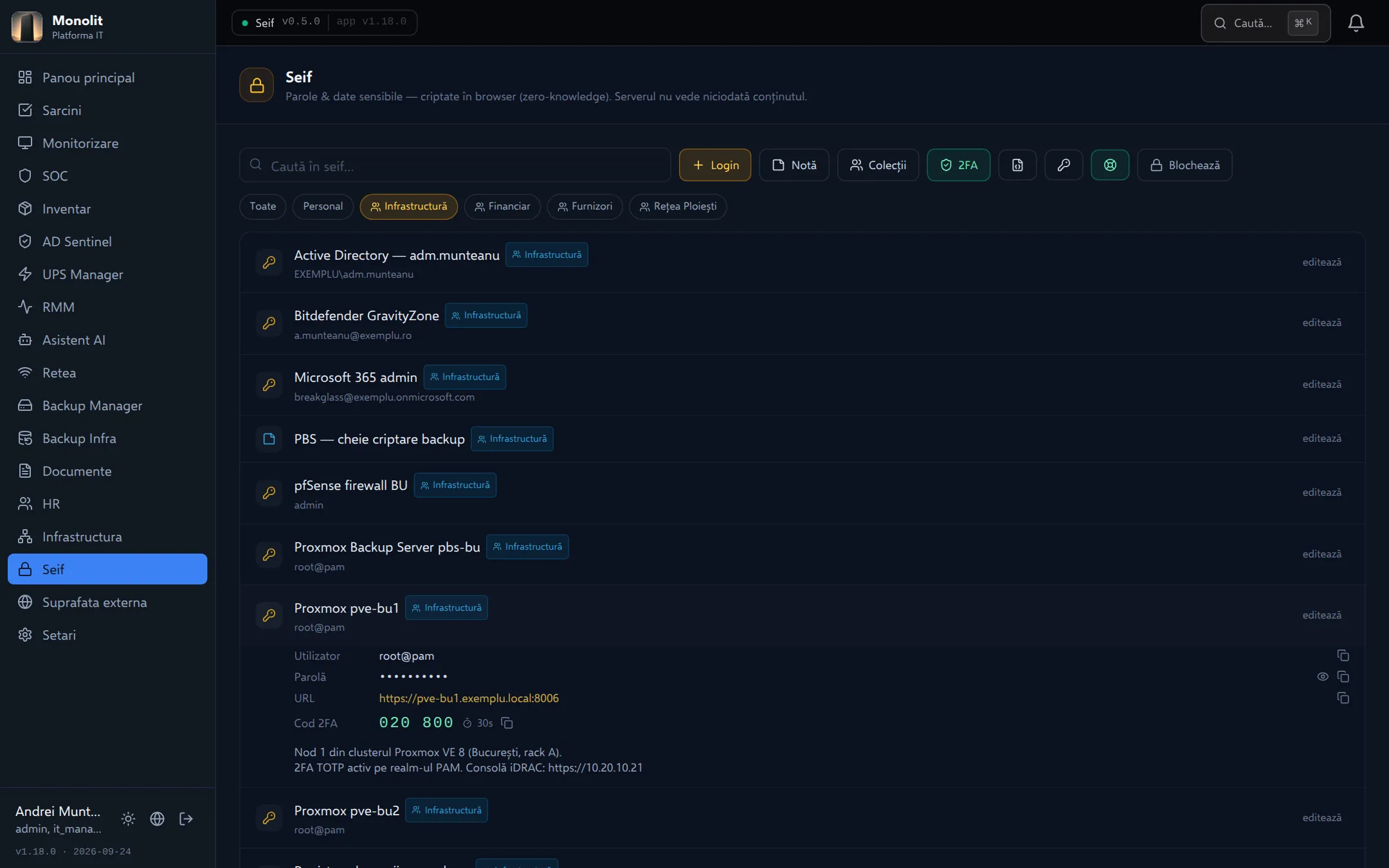
The unlocked vault, on the Infrastructure collection. The vault list filtered on the Infrastructure (Infrastructură) team collection, with the Proxmox pve-bu1 item open: username, masked password, address, and the 2FA code generated locally. Everything is decrypted in the browser; the server keeps the data only in encrypted form and cannot read it.

Screenshots from the application

What it looks like at work

The real Monolit interface, with data from a fictional company on a typical day. The interface in the screenshots is in Romanian. Click a screenshot to see it at full size.

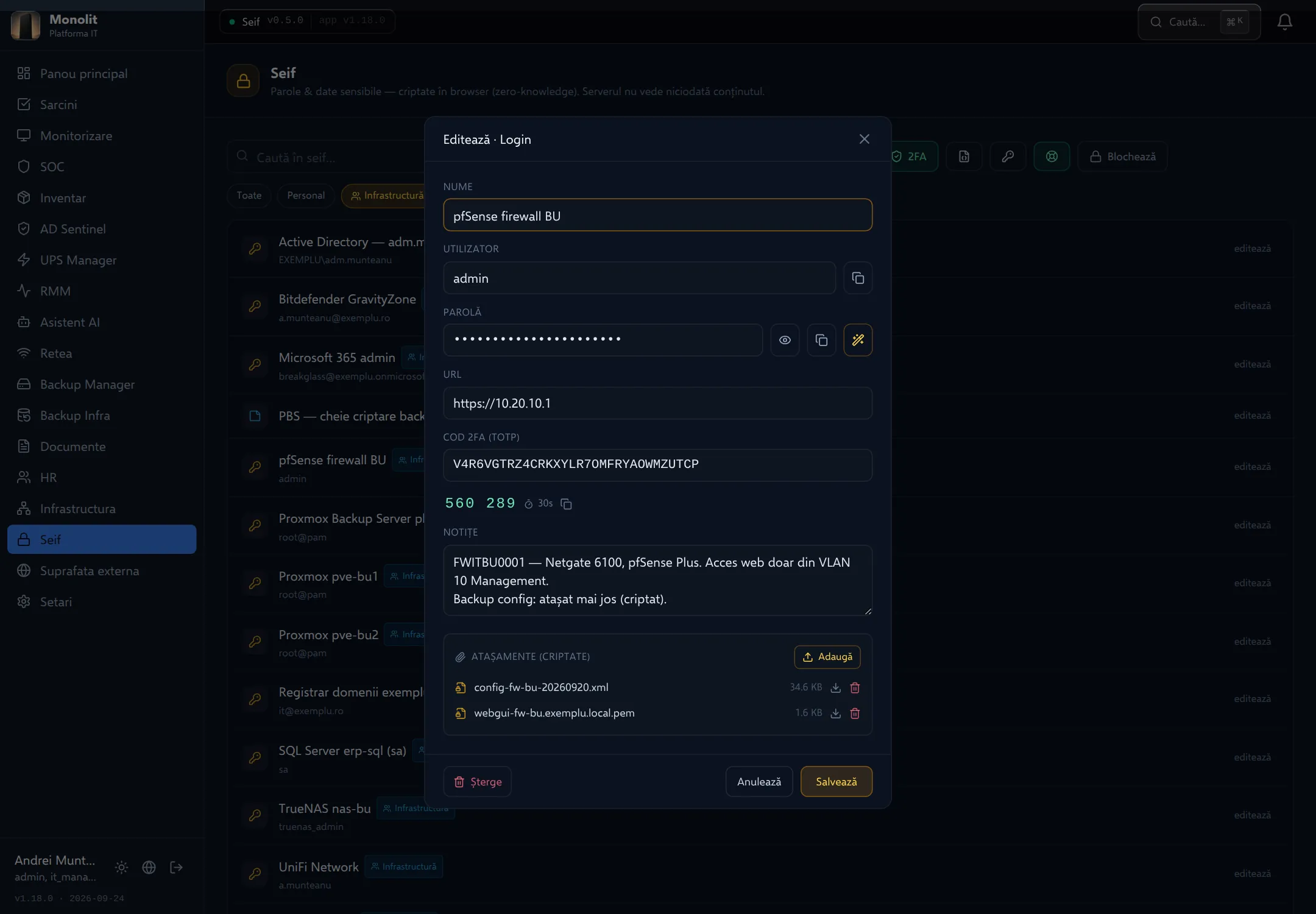
An item with a 2FA code and encrypted attachments. The pfSense firewall BU item: the TOTP secret and the current code, the notes, and two attachments (configuration backup, certificate). Files are encrypted before they leave the browser.
Screenshot 2 of 4

An item with a 2FA code and encrypted attachments

The pfSense firewall BU item: the TOTP secret and the current code, the notes, and two attachments (configuration backup, certificate). Files are encrypted before they leave the browser.

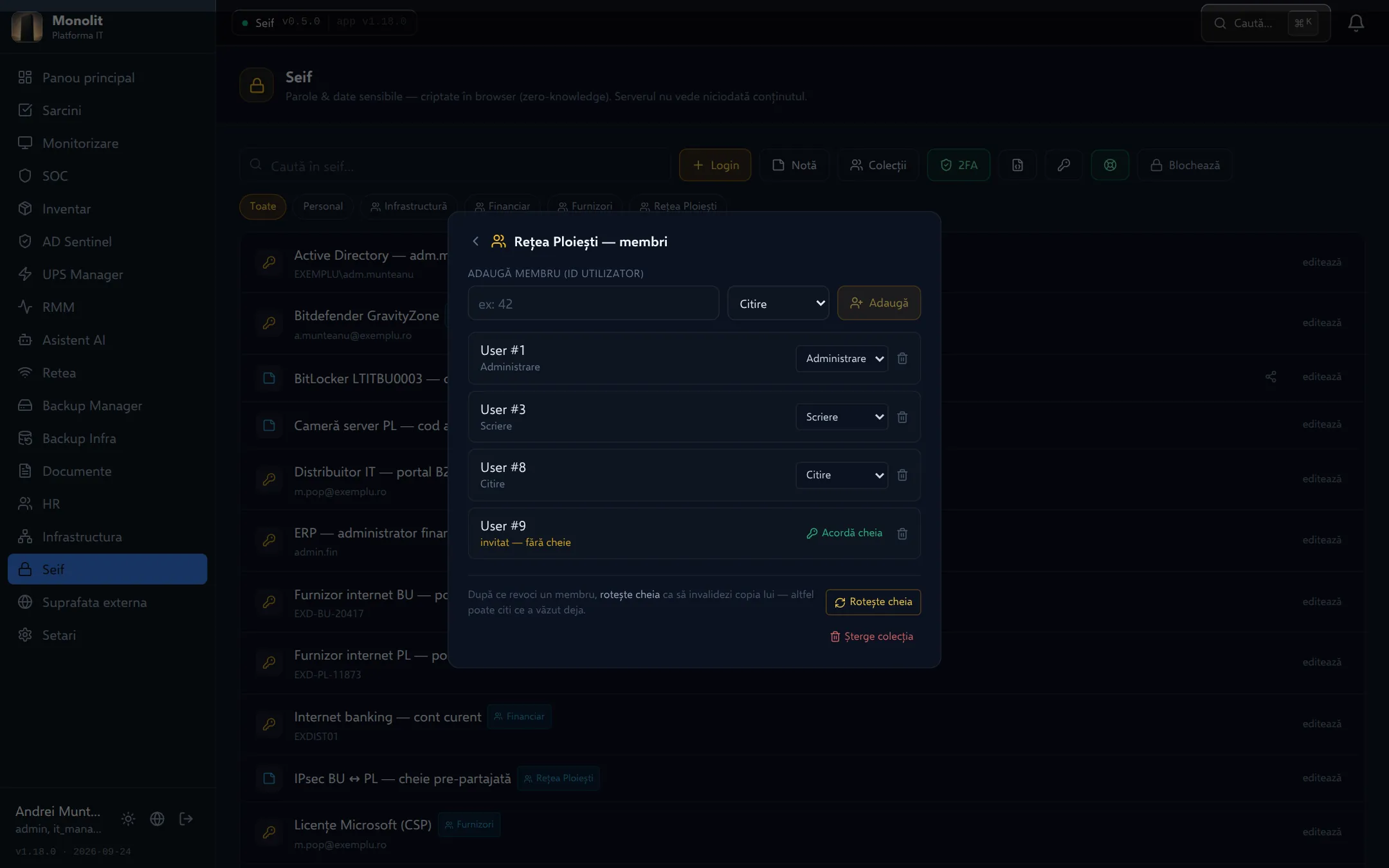
A collection’s members and their rights. The Ploiești Network collection (Rețea Ploiești): a permission for each member (manage, write, read) and an invited colleague who has not created a vault yet, so has no key. After a member is removed, “Rotate key” (Rotește cheia) makes sure that person can no longer open the collection.
Screenshot 3 of 4

A collection’s members and their rights

The Ploiești Network collection (Rețea Ploiești): a permission for each member (manage, write, read) and an invited colleague who has not created a vault yet, so has no key. After a member is removed, “Rotate key” (Rotește cheia) makes sure that person can no longer open the collection.

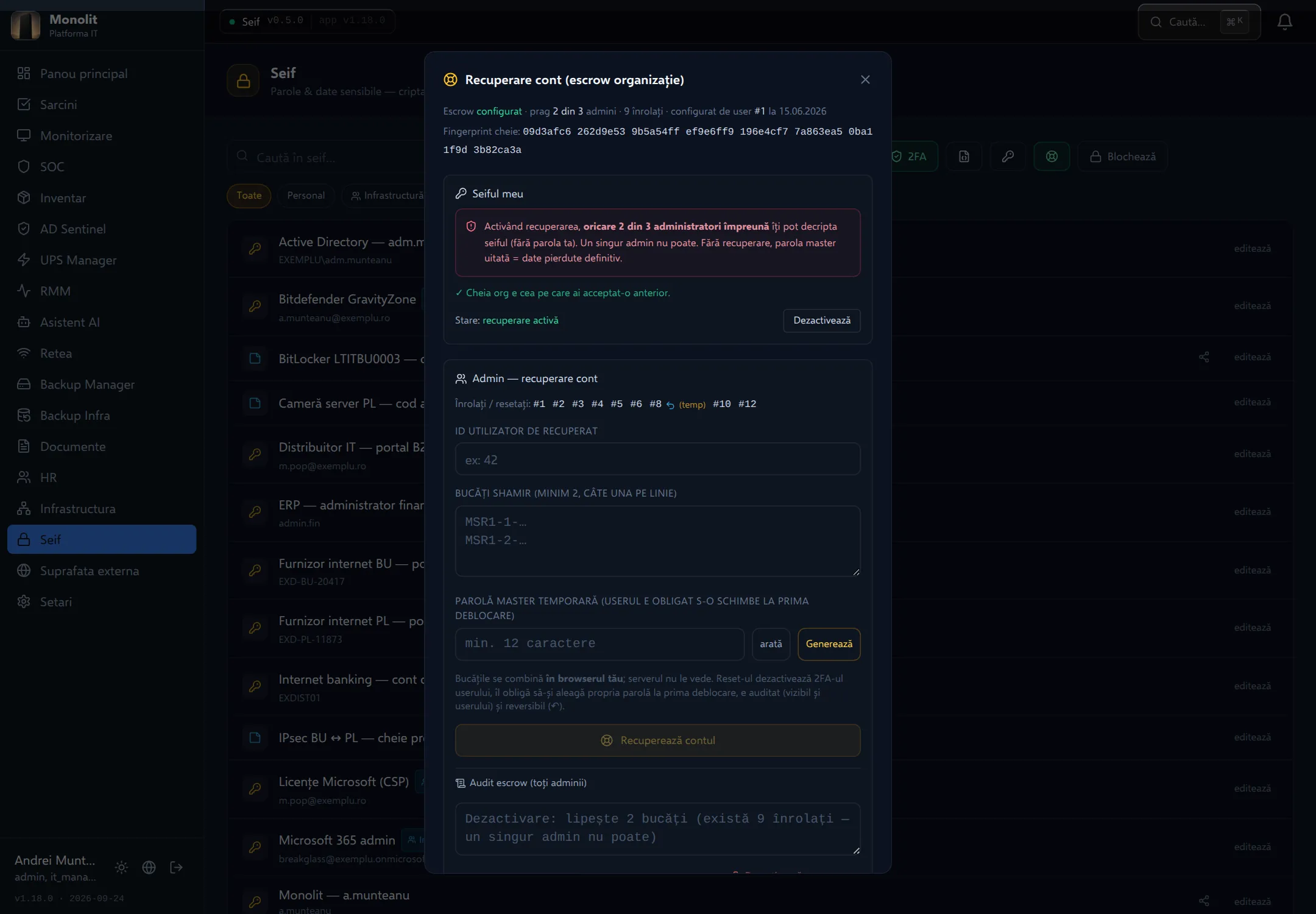
Emergency recovery, 2 of 3 administrators. The organization’s emergency recovery: any 2 of 3 administrators can together recover the vault of a colleague who forgot the master password; one alone cannot. There are 9 enrolled accounts, and #8 was reset yesterday and still uses the temporary password.
Screenshot 4 of 4

Emergency recovery, 2 of 3 administrators

The organization’s emergency recovery: any 2 of 3 administrators can together recover the vault of a colleague who forgot the master password; one alone cannot. There are 9 enrolled accounts, and #8 was reset yesterday and still uses the temporary password.

1Level 1

For leadership

What problem it solves, how the team works with the module, and what can be measured.

What problem it solves

The company’s administrative passwords (servers, firewall, cloud accounts, supplier portals, banking tokens) usually end up in Excel files, in notes, or only in one person’s memory. When that person leaves or is away, nobody knows who has access to what. When a file with passwords ends up where it should not, all of them are exposed at once. And the passwords that programs need are often written in their configuration files.

The Vault keeps this data encrypted, shares it with teams in a controlled way, and keeps a recovery path that does not depend on a single person. Separately, it stores the passwords that Monolit modules need: each module receives only the secrets it is permitted to read, and every read is logged.

What it does in practice

  • Each user has a personal vault, unlocked with a master password separate from the Monolit sign-in. The personal vault and team collections are encrypted on the user’s computer: the server stores only encrypted data and cannot read the content.
  • Item types: login (username, password, URL, 2FA code, notes) and secure note. Cards and identities can be brought in through import.
  • Password generator and 2FA code (TOTP) shown directly in the vault for accounts that require it.
  • Encrypted attachments: configuration files, certificates, recovery codes.
  • Team collections: shared passwords with per-member rights (read, write, manage).
  • Protections in use: automatic lock after a period of inactivity or when the tab is hidden, automatic clipboard clearing, 2FA at unlock with backup codes.
  • Emergency recovery (optional): any K of N administrators can together recover the vault of a colleague who has forgotten their master password. A single administrator cannot.
  • Import from a Bitwarden export (unencrypted .json) or from a generic JSON; .json export of personal items.
  • Service secrets: the passwords and tokens used by Monolit modules are kept in a separate section, visible only to IT administrators. Unlike the personal vault, here the server can decrypt them, so that modules can use them, but only for authorized modules. A copy of the database alone is not enough to decrypt them.
  • A service secret’s value is entered, but the list does not display it. To see it again, you need your personal vault unlocked and the 2FA code, and the value disappears after a short time. Deleting a secret and changing which modules can read it require approval from a second administrator. Expiration and changes that are due are flagged in the list.

Workflows

1. A new technician joins the IT team

  1. The technician creates their vault and chooses their master password.
  2. The administrator of the “Infrastructure” collection adds them as a member, with read or write rights.
  3. The new member immediately sees the shared passwords, without the passwords passing through the server unencrypted.

2. A member leaves the team

  1. The collection administrator removes them from the member list.
  2. They click “Rotate key”: the collection gets a new key, which only the remaining members receive.
  3. The former member no longer has access to the collection, not even with what they had received before. What they saw or copied before cannot be taken back, so the important passwords they had access to should be changed, both in the systems themselves and in the vault.

3. A colleague has forgotten their master password

  1. If they turned on recovery, the designated administrators (for example two out of three) enter their key shares together.
  2. The colleague’s vault receives a temporary master password, and their 2FA is turned off.
  3. At the first unlock, the colleague must choose their own password. The administrators will not know it.
  4. The operation appears in the recovery audit, visible to all administrators and to the colleague, and can be canceled.

4. A module’s password moves into the Vault

  1. In Infrastructure Backup → Settings, the “Where the secrets are” card shows which tokens are still stored in the module’s configuration.
  2. The administrator clicks “Move to Vault”. The secret moves into the service vault, and the local copy is deleted only after the module confirms it can read it from there.
  3. From then on, every read is logged. A module that requests a secret without permission is refused, and the request is flagged.

Benefits and metrics

  • Critical passwords are in one place, encrypted, with named access per collection, not in shared files.
  • The number of members in each collection and each member’s permission are visible at any time.
  • The number of users enrolled in recovery shows how many vaults will not be lost to a forgotten password.
  • Administrative accounts with 2FA have their code in the vault, so access does not depend on one person’s phone.
  • After each departure from the team, rotating the collection key confirms that the former member’s access has been closed.
  • For each service secret, you can see the modules that use it, when it was last read, and whether it is due to be changed.

2Level 2

For the IT team

Integrations, requirements, roles, control, and known limitations.

What the IT team gets

  • A vault that uses the Monolit sign-in, with no separate account to manage. The module runs isolated from the platform’s other modules.
  • Encryption with standard, recognized algorithms, on the user’s computer. The master password does not reach the server, and repeated unlock attempts are limited. The minimum protection level is enforced in the browser: if the server asked for weaker parameters, the browser would refuse them.
  • Emergency recovery is configured once: the administrator chooses how many administrators receive a share of the recovery key and how many must come together to recover a vault (at least two). The shares never reach the server. The person configuring it sees them only once, distributes them to the administrators, and proves that they have been saved. Each user chooses whether to enroll. As long as there are enrolled users, turning off recovery requires as many shares as a recovery does.

Service secrets

  • A section separate from the personal vault: a problem in it does not stop the personal vault.
  • Each module reads only the secrets it is permitted to read, and only from the Monolit server. A request that is not allowed is refused and flagged in the log.
  • A new value creates a new version; the replaced one is kept for a while.
  • A brief unavailability of the vault does not stop the modules that use the secrets.
  • They are currently used by Infrastructure Backup (access to Proxmox and to the storage targets) and AD Sentinel (one service account per role). Only a reference remains in the module’s configuration, not the value.

Roles and audit

  • Any authenticated user can create their vault. On collections, the rights are read, write, and manage (members, key rotation, deletion).
  • Configuring emergency recovery and recovering accounts are for administrators only.
  • Service secrets are for administrators and the IT manager only. The list shows only data about the secret, not the value. “Show” requires the personal vault unlocked and a new 2FA code, which cannot be reused.
  • Deleting a secret and changing which modules can read it take effect only after approval from a second administrator or IT manager; an unapproved request expires. A company with only one eligible person can turn off two-person approval: a single person then approves, with an audit record.
  • The general audit log contains only who, what, and when, without content. The recovery audit is separate and visible to all administrators: configuration, deactivation, reset, restoration, and any retrieval of keys. The service secrets log shows changes, requests, reads, and refusals.

Requirements

  • HTTPS required. On an address without HTTPS, the module shows instructions for the administrator instead of the vault.
  • A recent browser.
  • For service secrets: a one-time initialization on the server, which shows the recovery kit for the master key only once (to be kept offline) and prepares access for each module that uses them.

Limitations

  • The interface creates only logins and notes. Cards and identities come in only through import.
  • Members of a collection are currently added by account number, and the list shows them without names.
  • Personal folders and the favorite marker do not have an interface yet.
  • The Bitwarden import accepts only unencrypted exports.
  • The export is in plain text and must be treated as a secret document.
  • The module has only a web interface; there is no browser extension for autofill.
  • Service secrets are currently used by Infrastructure Backup and AD Sentinel. The other modules still keep their passwords in their own configuration.
  • The module is functional but still in development.