What problem it solves
To find out what happened in Active Directory, in a system log, or in a workstation’s traffic, you usually have to go through several screens and know what to look for. AI Assistant answers questions about the infrastructure in Romanian and, on request, explains the alerts, logs, and errors that Monolit already collects. The model runs on a server on the company network (Ollama or LM Studio). That server’s address is limited to the internal network and can be changed only by administrators, so the context sent to the model does not reach an AI provider.
What it does in practice
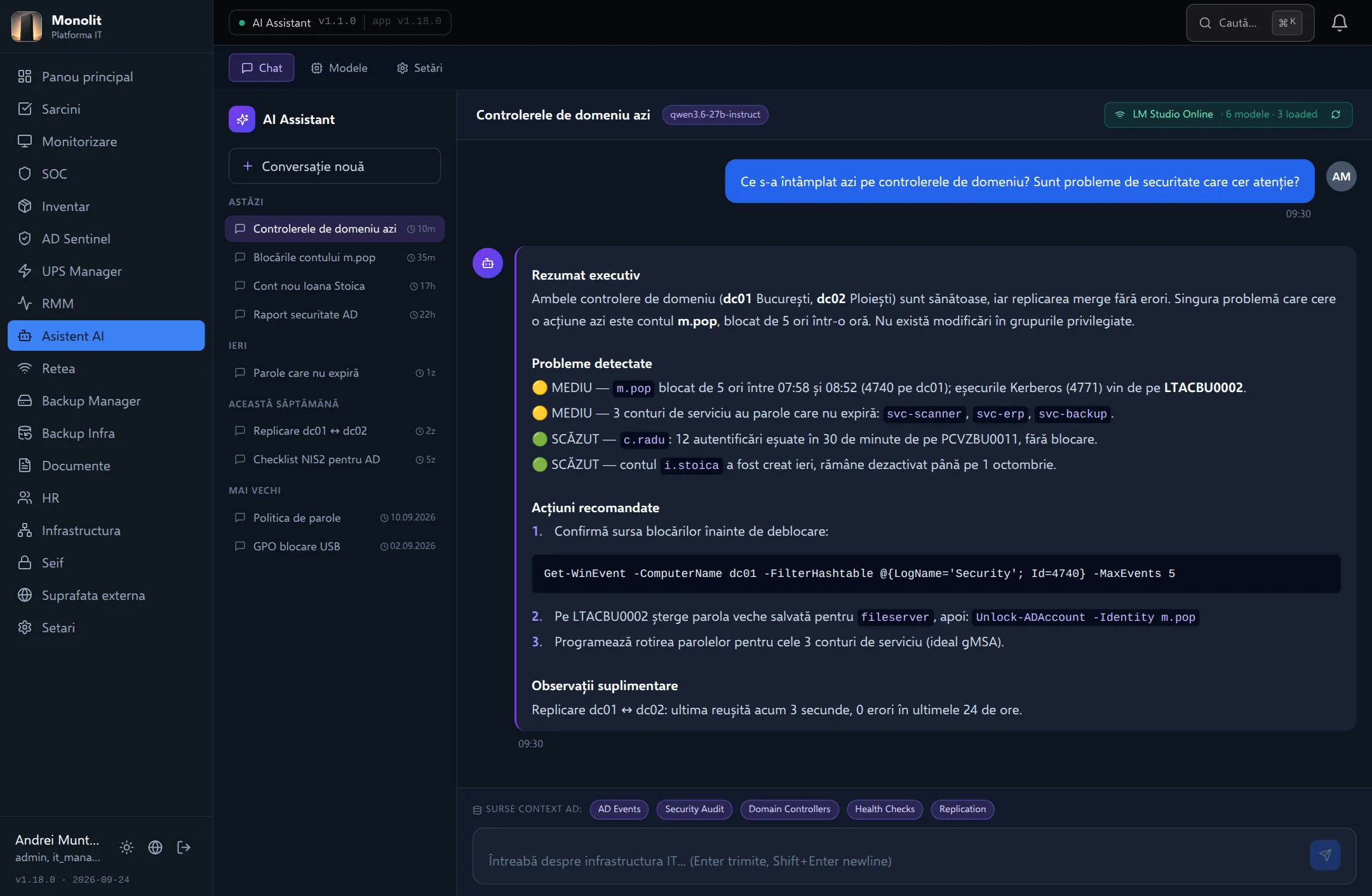
- Chat, with the answer displayed as it is generated.
- Answers with a fixed structure: an executive summary, the problems detected with their severity, recommended actions (with PowerShell commands where appropriate), and observations.
- Context from Active Directory, chosen by the user for each question: events (lockouts, failed sign-ins, group changes), the security audit, the domain controllers, health checks, and replication. AD data is used in answers only for IT team accounts.
- Conversation history, grouped by day. A conversation can be read, continued, and deleted only by the person who started it; not even an administrator can see it from the application.
- The same component also works for other modules, usually at the press of a button:
- AD Sentinel: diagnosis of the logs on the domain controllers, with each finding linked to the events it relies on;
- SOC: the daily summary (automatic), explaining alerts, identifying the Internet addresses that appear in traffic, explaining intrusion detection signatures, explaining the tiles on the SOC wall and the external threat level, an opinion on a device’s traffic, the AI section of an issue card, and conversations with follow-up questions on any of these explanations;
- RMM: a summary of a workstation’s system logs and troubleshooting of an error code, with follow-up questions. When a workstation or server has repeated critical errors or a failed service, Monolit gathers the logs automatically and attaches the explanation to the alert, without repeating the analysis for every alert from the same workstation. Problems that appear on several computers are shown together, on the “Common issues” page.
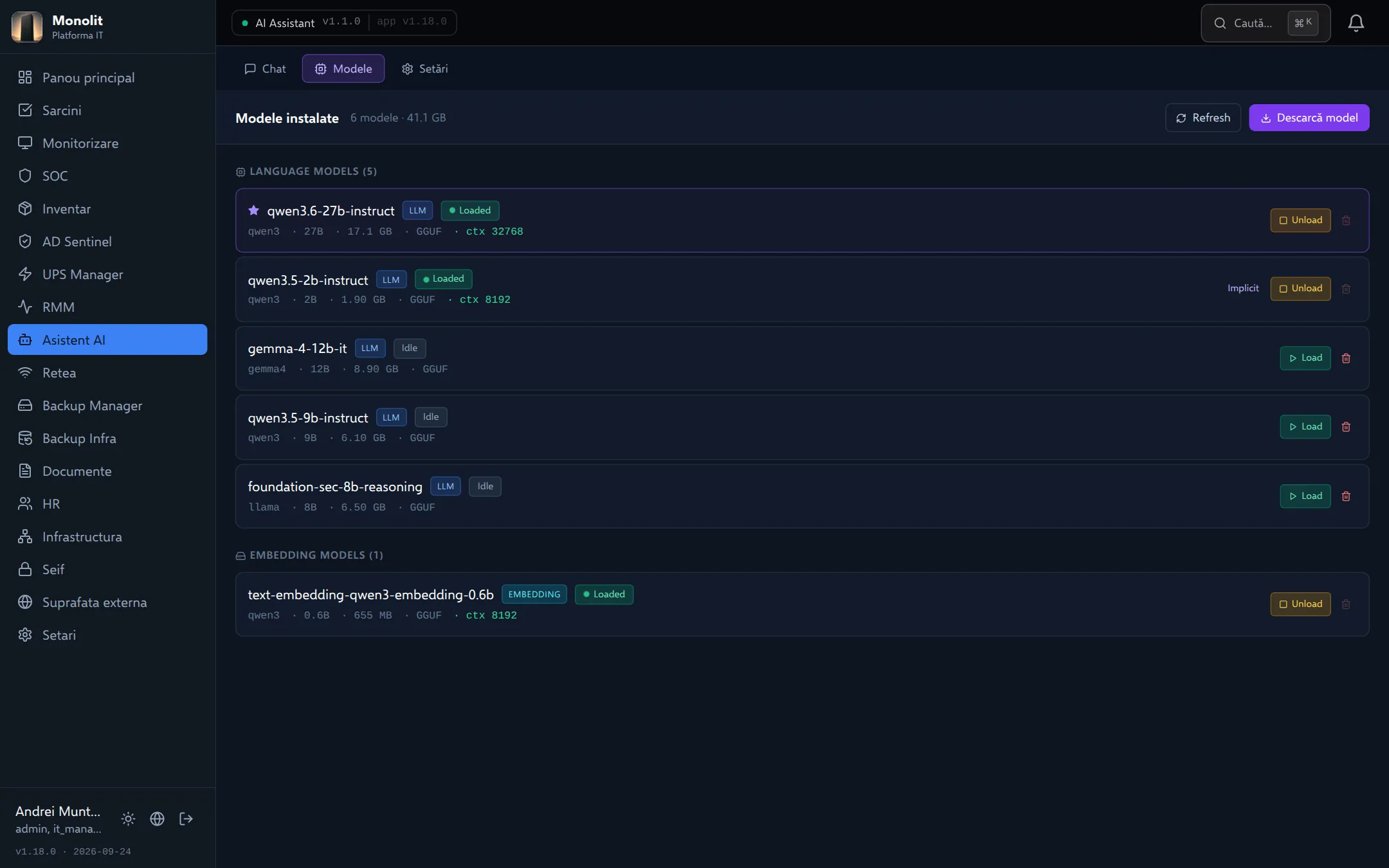
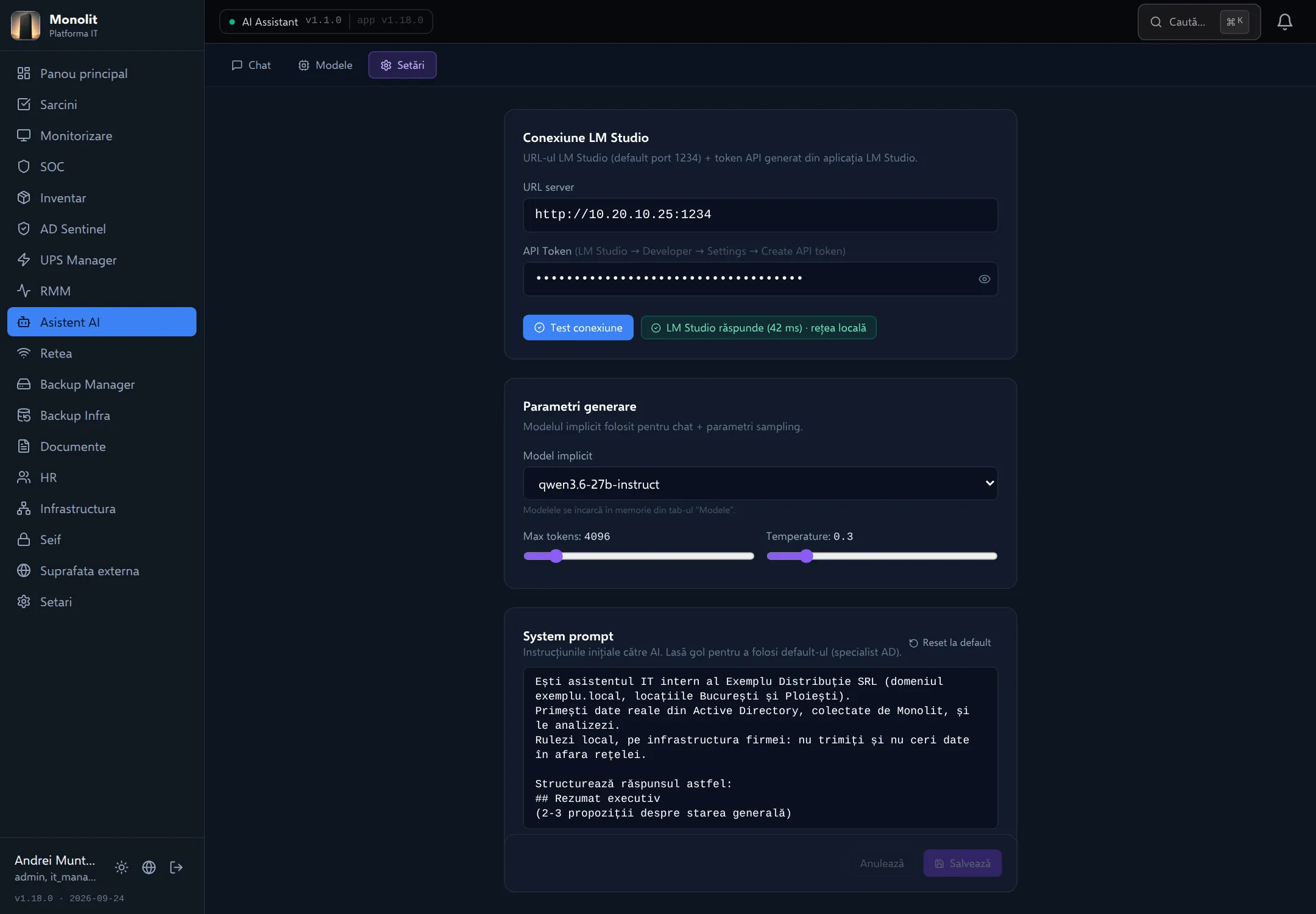
- For administrators: the models on the server, the choice of the default model, and the model server settings. On a server also used by other applications, model management from Monolit can be limited to read-only.
- The assistant only explains and suggests. It does not execute any action. In the domain controller diagnosis, a suggestion from the allowed list becomes a button that opens the usual AD Sentinel procedure, with pre-checks and a person’s confirmation.
AI conversations in SOC
An explanation of an alert, of a tile on the SOC wall, or of a detection signature can be continued in SOC → “AI conversations”, with questions asked in Romanian. Only administrators and the IT manager use conversations.
- Every answer has the same form: the short and the long answer, the facts it relies on, what the data does not show, what needs checking, a few read-only commands for a person to run, an opinion on severity (or none, if the data is not enough), and how confident the answer is.
- The answer has no field such as “false alarm” or “to close”: labeling the alert remains a person’s job.
- The IT team can write short notes about a type of alert (“it is usually…”, “check…”). The model is not retrained: the notes are given to it as internal information, which may be wrong or out of date. A note with personal data, accounts, or workstation names and addresses is rejected, and on critical alerts the notes do not reach the model. The assistant can suggest a note, but a person writes it. Notes do not change an alert’s verdict, status, or notification.
What the server decides, not the model
In the domain controller diagnosis, Monolit establishes the facts, and the model only explains them:
- If Monolit could not read a controller, the screen says so separately, with the account used, who requested the analysis, and the reason. The analysis shows as “incomplete”, not as “no problems”.
- Each finding has its evidence: the original event, how many times it occurred, and its first and last occurrence. A finding without evidence remains visible but is marked “not supported by the data” and gets no buttons.
- For common warnings that do not indicate a fault, for example a replication pause while a backup is running, the known explanation is shown next to the evidence.
- The overall severity cannot go below what the server establishes from the facts: a controller that could not be read or that is not responding never shows as “no problems”.
- A summary that claims an attack, a compromise, or missing services without evidence is replaced with one calculated by the server. The check does not catch every possible wording.
What reaches the model
- In the SOC and RMM analyses, passwords and tokens captured in logs are masked before sending.
- In the summary of a workstation’s logs and when troubleshooting an error, accounts and addresses are replaced with pseudonyms. The real names stay in RMM and are visible only to the IT team.
- The opinion on a device’s traffic is formed without personal names or accounts.
- When explaining an alert and in conversations about alerts, the model does not receive the workstation name, the account, or the raw event text, only the workstation’s role (server, workstation, domain controller). Conversations about tiles on the SOC wall and about signatures do not receive data marked as private. The question written by a person is also masked before sending, and Monolit keeps only the masked text.
- When identifying Internet addresses, internal addresses do not reach the model.
- For SOC behavior detections, only the technical characteristics of the finding reach the model, without workstation names, accounts, or owners.
- When explaining the external threat level, the model receives only verified data, not text written by third parties, so a compromised source cannot give it instructions.
- In the domain controller diagnosis, collection errors (the account used, the error text) do not reach the model: they are shown only to the user. For a service whose state could not be read, the model only learns that the state is unknown.
Workflows
1. A question about the state of the domain
- The administrator opens a new conversation and leaves the needed context sources checked.
- They type the question in Romanian.
- They receive the structured answer and copy the suggested commands.
- The conversation stays in the history and can be continued.
2. Diagnosing the logs on the domain controllers
- In AD Sentinel → “AI diagnosis”, the administrator chooses one controller or all of them, plus the time range (6 hours to one week), and starts the analysis.
- If a controller could not be read, the “Monolit could not read” banner appears first: the controller, the source (logs or replication), the account, who requested it, and the reason (for example password rejected, timeout, port closed), with the step to check in AD. “Who?” shows the session from the AD Sentinel log, and “Check account access” tells a wrong password or a locked-out account apart from a missing remote access right.
- The model returns findings with their evidence, under “Details and source”, and the state of the core services at the time of collection (“Current state”).
- For a finding supported by the data, the suggestions from the allowed list open the AD Sentinel procedure, with pre-checks, confirmation, and logging. The list has read-only checks and a few low-risk repairs. The buttons appear only for administrators and the IT manager, and only on the finding’s controller. The other suggestions remain manual steps.
3. An error that keeps recurring on a workstation
- In RMM, on the workstation’s page, the administrator selects the error in the log and clicks “Troubleshoot”.
- Monolit gathers the facts (the error’s history, the surrounding events, other affected workstations), pseudonymizes them, and sends them to the model.
- The answer shows what the error means, the likely causes with evidence, the steps to confirm it, the fix with its risk, and when it can be ignored. Follow-up questions can be asked.
4. A question about an alert
- In SOC, after “Explain with AI” on an alert, the IT manager clicks “Continue the conversation” and, in the new tab, “Start a conversation”.
- Monolit gathers and masks the alert data, and the manager writes the question.
- The answer shows what it relies on, what is not known, and what needs checking. Further questions follow, in the same conversation.
- If the manager has learned something useful for next time, they write a note about this type of alert. Closing the alert and labeling it remain their decision, in the alerts screen.
5. Changing the model
- In “Models”, the administrator sees the models installed on the server and those loaded in memory.
- They mark the one they want as the default.
- In “Settings”, “Test connection” confirms the server type, that the server responds, and how many models it has.
Metrics tracked
- The connection status of the model server: online or offline, the server type, the models installed and loaded (checked automatically).
- The model used for each answer.
- A warning when the context sent to the model was truncated.
- For the daily summary and triage in SOC and for the RMM analyses: the model used and who requested the analysis. For SOC conversations: the model and the duration of each answer.
- For the domain controller diagnosis: the controllers that could not be read, the “Incomplete analysis” marker, findings not supported by the data, and how many of the model’s suggestions were rejected by the safety filter.