Continuity and people

HR

Onboarding and offboarding as step-by-step workflows, with equipment from inventory, PDF documents, and automatic IT tasks; an offboarding is completed only after access has been revoked.

Version
1.2.0
Stage
Stable
Screenshots
4
Replaces
Paper checklists and emails between HR and IT
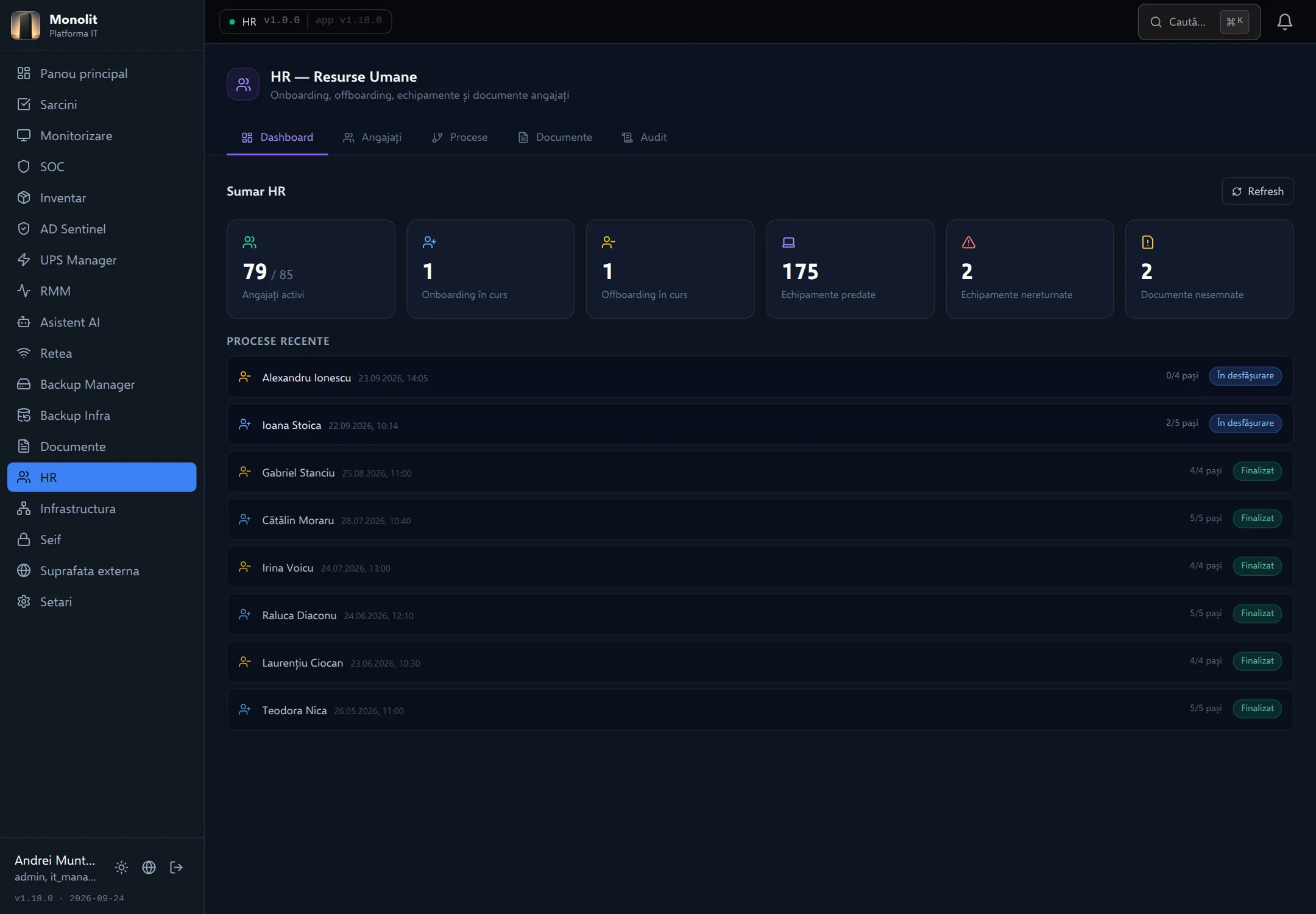
HR dashboard. The HR overview shows 79 active employees out of 85 records, one onboarding and one offboarding in progress, two unreturned assets, and two unsigned documents. Processes in progress reopen from the list exactly at the step where they stopped.

Screenshots from the application

What it looks like at work

The real Monolit interface, with data from a fictional company on a typical day. The interface in the screenshots is in Romanian. Click a screenshot to see it at full size.

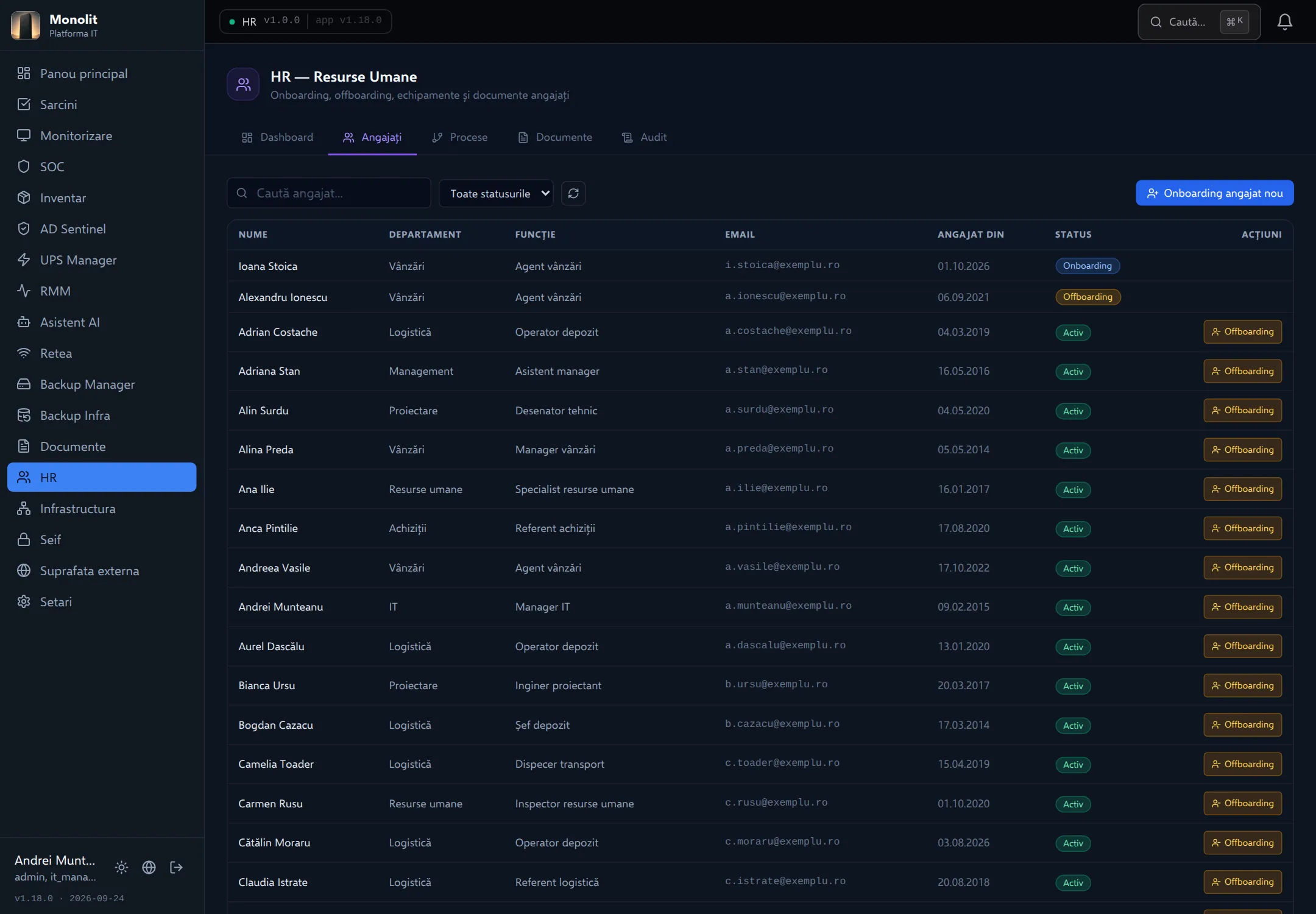
Employee list. Employee records with department, job title, email, hire date, and status; Ioana Stoica is in onboarding, and Alexandru Ionescu in offboarding. For any active employee, offboarding starts from their row.
Screenshot 2 of 4

Employee list

Employee records with department, job title, email, hire date, and status; Ioana Stoica is in onboarding, and Alexandru Ionescu in offboarding. For any active employee, offboarding starts from their row.

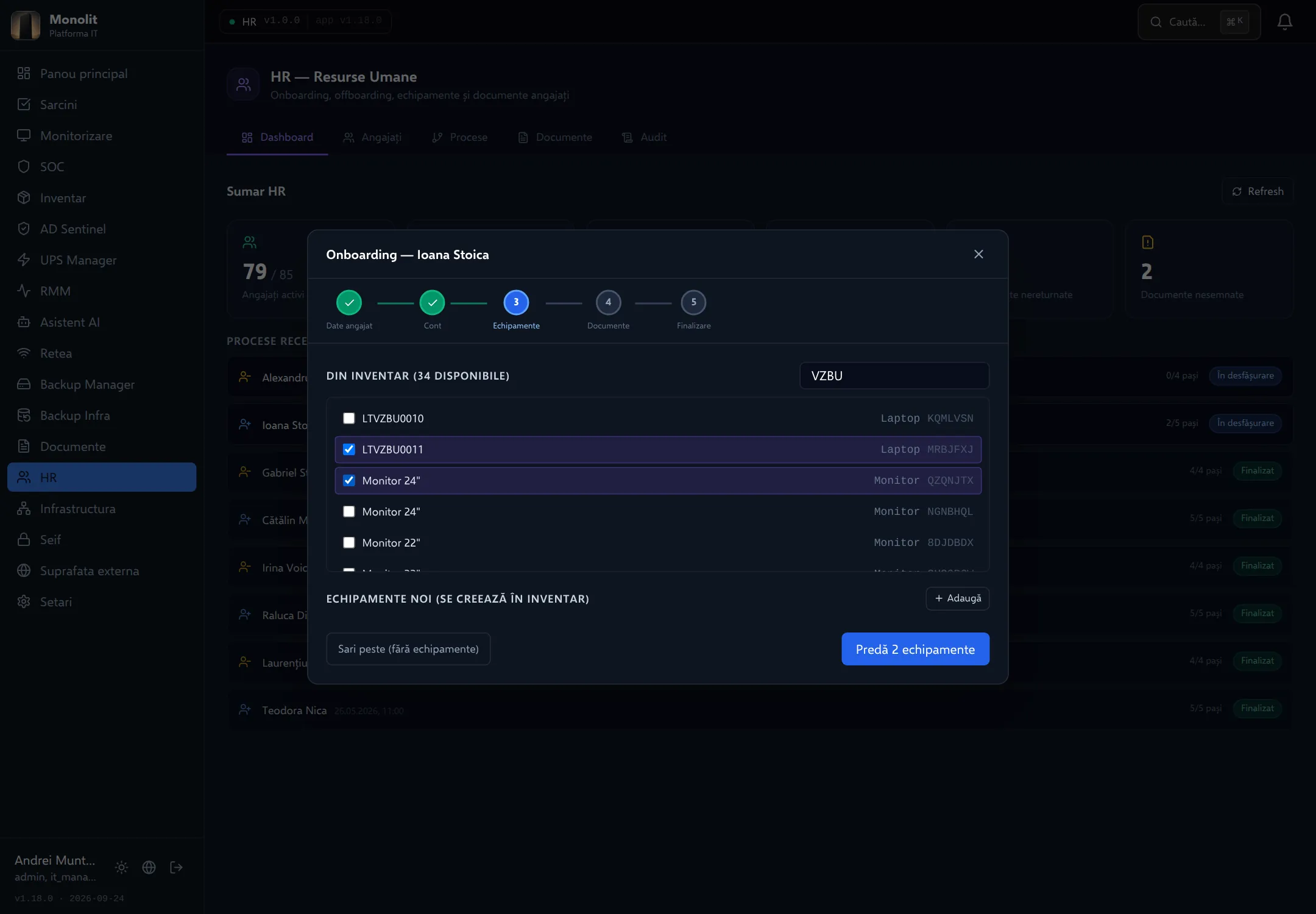
Onboarding: Ioana Stoica. Step 3 of 5 for Ioana Stoica, who starts in sales on October 1: a laptop and a monitor are picked directly from inventory, after her account was created in the previous step. On completion, the IT task for the AD account, email, VPN, and workstation is created automatically in Task Manager, and the process closes after the system confirms it.
Screenshot 3 of 4

Onboarding: Ioana Stoica

Step 3 of 5 for Ioana Stoica, who starts in sales on October 1: a laptop and a monitor are picked directly from inventory, after her account was created in the previous step. On completion, the IT task for the AD account, email, VPN, and workstation is created automatically in Task Manager, and the process closes after the system confirms it.

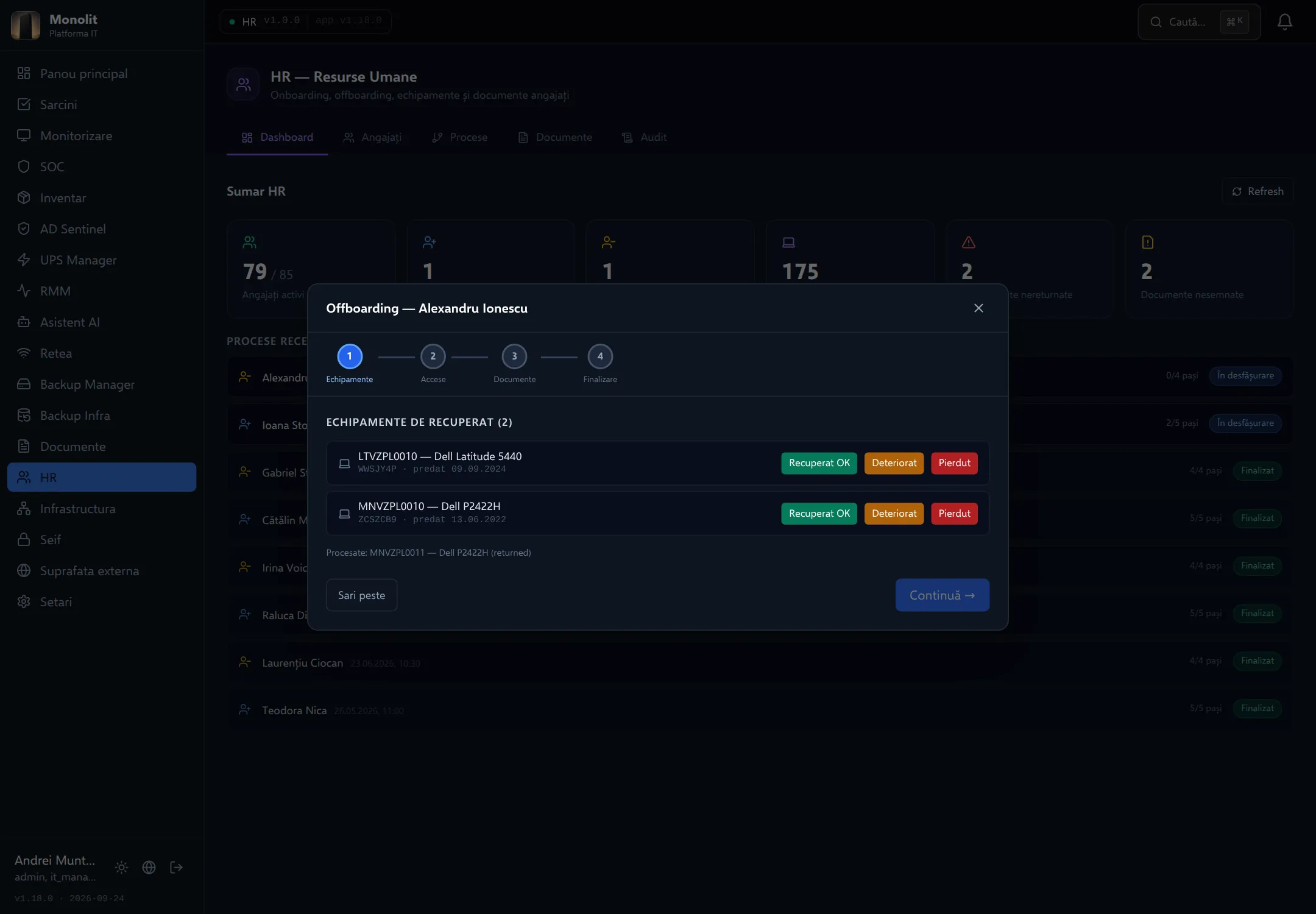
Offboarding: Alexandru Ionescu. The first step of Alexandru Ionescu’s departure, with his last day on September 30: the laptop and one monitor are still to be returned, and the second monitor has already been handed back. Each asset is marked as returned, damaged, or lost; the “Continue” (Continuă) button stays disabled until all of them are marked. The “Skip” (Sari peste) button in the screenshot no longer exists for HR: only an administrator can skip the step, with a written reason recorded in the log.
Screenshot 4 of 4

Offboarding: Alexandru Ionescu

The first step of Alexandru Ionescu’s departure, with his last day on September 30: the laptop and one monitor are still to be returned, and the second monitor has already been handed back. Each asset is marked as returned, damaged, or lost; the “Continue” (Continuă) button stays disabled until all of them are marked. The “Skip” (Sari peste) button in the screenshot no longer exists for HR: only an administrator can skip the step, with a written reason recorded in the log.

1Level 1

For leadership

What problem it solves, how the team works with the module, and what can be measured.

The HR module connects human resources and IT at the moments when mistakes happen most often: when someone joins and when someone leaves. Every step (account, equipment, documents, access) has an owner and a trail, and IT automatically receives what it has to do. A departure is complete only when the system confirms every mandatory step: the Monolit account is disabled, the IT task to revoke access (domain, VPN, email) is created, and the equipment is returned and released in the inventory. Only an administrator can skip a step, with the reason recorded in the audit log.

What it does in practice:

  • Employee record: contact details, department, job title, manager, hire date, and, on departure, the end date. Only the last 4 digits of the national identification number (CNP) are kept. The Monolit account found by the email address in the record is shown for confirmation before it is linked, so that the right account is disabled on departure.
  • Onboarding in 5 steps: employee details, Monolit account, equipment, documents, completion. The process closes when the system confirms the IT task and, if one was requested, the account.
  • Offboarding with confirmations: equipment return (confirmed in the inventory), access revocation, documents, and completion, then account deactivation and the IT task, confirmed automatically. The process closes only when all of them are confirmed.
  • Resumable processes: the wizard for a process in progress can be closed and reopened at any time; it continues from the first unfinished step. An employee has only one active process: a rehire does not start while the previous departure is still awaiting confirmation.
  • Equipment from Inventory: at hiring, items are chosen from available stock or created directly in the inventory; on departure, each item is marked as returned, damaged, or lost.
  • Documents: the document types are separate for hiring and departure (for example the equipment return report and the clearance form, on departure). When hired, the new employee receives the GDPR privacy notice (the signature confirms receipt only) and, separately, the consent form for optional processing, with YES or NO for each item. Documents are generated as PDF, printed, and signed; then the signed scan is uploaded. The GDPR texts are a template: they must be reviewed by the company’s legal counsel before use.
  • Automatic IT tasks on completion, in Task Manager: the Active Directory account, email, VPN, and workstation at hiring; access revocation, with P1 priority, on departure.
  • Escalation: if a mandatory step fails, the IT manager automatically receives a P1 task, once per problem. “Retry now” reruns the operations; an administrator can skip a step only with a written reason, which stays in the log.
  • Retention report: the Retention tab lists the records of former employees whose retention period has passed, oldest first, with their documents, the equipment not yet returned, and the linked account. The report is informational only: a person decides on deletion.
  • HR dashboard with the metrics below and the recent processes.

Typical workflows:

  1. Hiring. HR creates the record and starts onboarding. They create the employee’s Monolit account (the initial password is shown only once). They choose the laptop and the monitor from inventory stock, generate the onboarding documents, print them for signing, upload the scans, and then complete the process. The employee becomes active, IT receives the task for the domain account, email, VPN, and workstation, and the process closes once the system confirms it.
  2. Departure. HR starts offboarding from the employee’s row, with the end date and the reason. They mark the equipment as it is returned; the continue button stays disabled while any equipment is still unmarked, and only an administrator can skip the step, with a reason. On completion, the employee becomes “Left”, and the process moves to “Awaiting confirmation”: the deactivation of the Monolit account, the P1 IT task, and the release of the equipment in the inventory are carried out and retried until they are confirmed. While anything is missing, the record shows “Unrevoked access”, and a failed step automatically goes to the IT manager.
  3. Unsigned documents. The dashboard shows how many documents are awaiting signature. The signed scan (PDF or photo) is uploaded from the Documents tab, and the document moves to the “Signed” status. Scans and late returns can also be recorded after completion, while the process is awaiting confirmation.

Metrics it provides: active employees out of the total, onboardings and offboardings in progress, equipment handed over, equipment not returned by employees who are leaving or have left, documents generated and not yet signed, processes awaiting confirmation, blocked or failed steps, former employees with unrevoked access, records past their retention period.

2Level 2

For the IT team

Integrations, requirements, roles, control, and known limitations.

Processes. Each hire or departure goes through the states “in progress”, “awaiting confirmation”, and “completed” (or “canceled”), and an employee has only one active process. System steps (equipment return, account deactivation, the IT task) are confirmed only by the system; an administrator can skip one, with a reason. Generated documents and signed scans are kept on the company’s server, each with a fingerprint that shows it has not been modified. Configuration covers the storage location for documents and the retention period for records, which is used in the privacy notice and in the retention report.

Nothing gets lost between modules. Account creation, IT tasks, and inventory movements start automatically from the process. If a module does not respond, the operation is retried automatically, without duplicates. Automatic retries use a dedicated service account, created by an administrator. A step that does not succeed goes to the IT manager as a P1 task, once per problem.

Integrations:

  • Inventory: choosing equipment from stock, creating new items directly from the wizard, assigning and releasing them; before release, the module checks who the item is assigned to.
  • Platform: creating the employee’s account, finding the account by email address and disabling it on departure.
  • Task Manager: the IT tasks for hiring and departure and the escalations, without duplicates on retry.
  • Main dashboard: the “People & equipment” panel (the HR figures appear only to administrators and HR).

GDPR. When an employee is hired, the privacy notice (Art. 13) is generated and, only if the company has defined optional processing, the consent form for it. The texts are completed with the company’s details: the data protection contact, the data protection officer (only if one is appointed), video surveillance, and IT monitoring. They are a template, to be validated legally.

Roles and audit. The module is visible and accessible only to administrators and the HR role, and permissions are checked on the server. HR can link only regular accounts to a record; privileged accounts are linked only by an administrator. Actions in the module are written to the audit log, with user, action, entity, details, and date. Documents can be downloaded only from a signed-in account, never through a public link. The retention report is read-only.

Requirements. The Monolit platform and a service account for automatic retries. Inventory and Task Manager are recommended: equipment comes from the first, and IT tasks go to the second.

Limitations.

  • Signing is physical (print, sign, scan); there is no electronic signature.
  • The account created during onboarding is a local Monolit account, with the employee role, for the ticket portal. IT creates the domain account, based on the generated task.
  • Records that reach the end of their retention period appear in the retention report, but are not deleted or anonymized automatically. Withdrawal of consent is recorded manually.
  • The interface has no button for deleting a record. Records with processes are not deleted; they remain archived with the “Left” status.
  • In the form for a new onboarding, the example texts in the fields are fixed.
  • In the list of equipment processed during offboarding, the status appears in English (for example “returned”), even in the Romanian interface.